This guide covers everything you need before you write a line of code. You will see what Seedance 2.0 can do, how it differs from Seedance 2.5, what each option costs per second or per video, and how to get an API key. Then you will send your first request and check both the result and the cost.
All examples use TokenRoc, which gives you Seedance and other video models through one API key and one balance in USD. Prices in this article were checked on 9 October 2026.
What is Seedance 2.0?
Seedance 2.0 creates video clips from prompts and reference media. This guide focuses on the model IDs and request options available on TokenRoc.
Three things make it stand out:
- Audio and video in one pass. The model creates sound together with the picture, so a clip does not arrive silent.
- Several kinds of input. Besides a text prompt, it can take images, video clips and audio as references. The supported reference fields depend on the model ID. Check its request options before sending media.
- Short, finished clips. The per-second models accept 4 to 15 seconds. Choose the resolution-specific model ID for the output size you need.
In practice, developers use the Seedance API for product videos, social media clips, ad variations, short scenes for games, and turning a still image into motion.
There is also a faster variant, Seedance 2.0 Fast. It is built for speed when you need results quickly, for example in a live preview.
Seedance 2.0 vs Seedance 2.5
Seedance 2.5 is the newer model in the same family. The biggest practical difference is length: Seedance 2.5 can make single clips of up to 30 seconds, while Seedance 2.0 tops out at 15. It also accepts more reference files and supports more local editing.
Here is how the two compare on TokenRoc:
| Seedance 2.0 | Seedance 2.5 | |
|---|---|---|
| Clip length | Up to 15 seconds | Up to 30 seconds |
| Per-second resolutions | 480p, 720p, 1080p, 4K | 480p, 720p, 1080p |
| Price per second at 720p | $0.20 | $0.30 |
| Fixed price per video | $0.60 (10 or 15 s, 720p) | $1.40 (30 s, 720p) |
Which one should you pick? Start with Seedance 2.0 for most work. It is cheaper per second, offers the widest range of resolutions, and 15 seconds is enough for most social clips and product shots. Move to the Seedance 2.5 API when you need longer single takes, where cutting two shorter clips together would look wrong.
Seedance 2.0 API pricing
On TokenRoc you can pay for Seedance in three ways. Each way has its own model ID, so the price is decided by the model you put in your request.
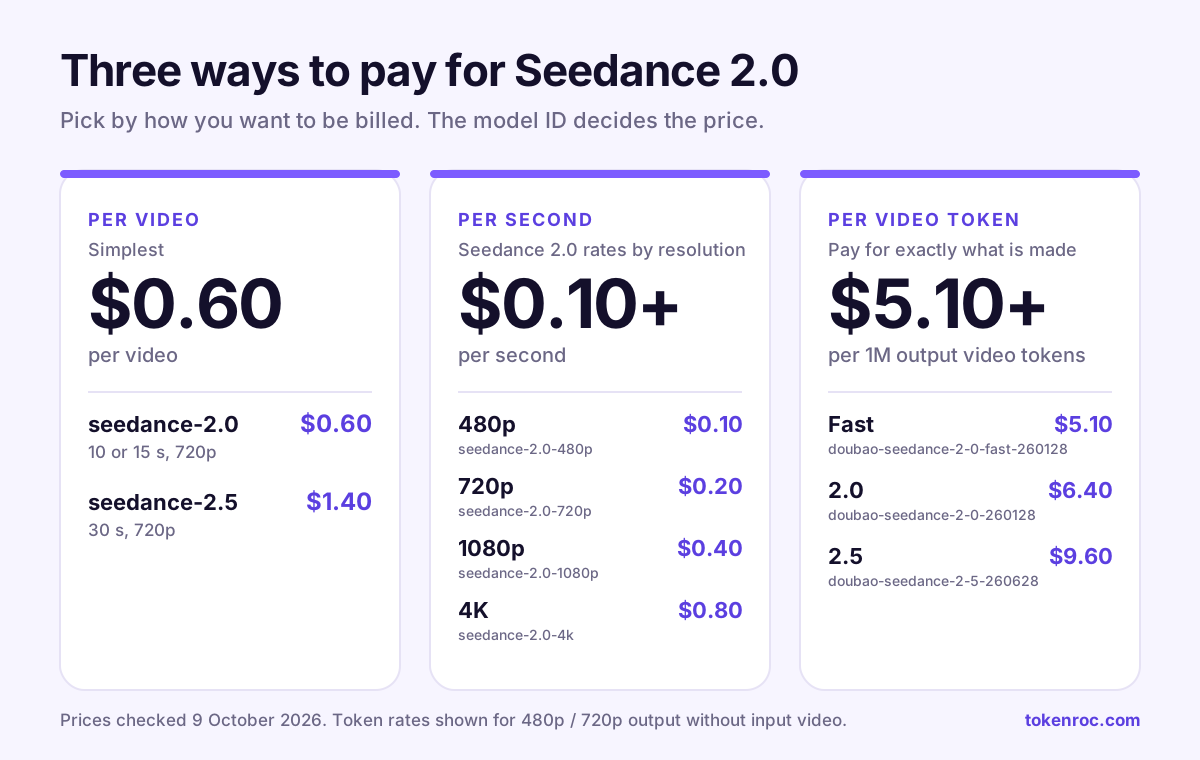
1. Per video (a fixed price per clip). The simplest option. You pay one price, whatever the prompt.
| Model ID | What you get | Price |
|---|---|---|
seedance-2.0 |
10 or 15 seconds at 720p | $0.60 per video |
seedance-2.5 |
30 seconds at 720p | $1.40 per video |
2. Per second (you choose the resolution). Use these when you need a specific resolution, such as 1080p or 4K, or a length the fixed options do not cover. The resolution is part of the model ID.
| Resolution | Seedance 2.0 model ID | Price per second | Seedance 2.5 model ID | Price per second |
|---|---|---|---|---|
| 480p | seedance-2.0-480p |
$0.10 | seedance-2.5-480p |
$0.10 |
| 720p | seedance-2.0-720p |
$0.20 | seedance-2.5-720p |
$0.30 |
| 1080p | seedance-2.0-1080p |
$0.40 | seedance-2.5-1080p |
$0.60 |
| 4K | seedance-2.0-4k |
$0.80 | Not offered |
These per-second models have a daily usage limit. When it is reached, availability may be restricted until it resets.
3. Per output video token (pay for exactly what is made). The Doubao Seedance models are billed by the video tokens the model produces. The rate per 1M video tokens depends on resolution and on whether you send an input video.
See Model Square for the current video-token pricing rules for each Doubao Seedance model.
Token pricing is the most precise, but you only know the exact cost after the video is made. It is a good fit once you have run a few tests and know your typical output.
What a clip really costs. A 10-second clip at 720p costs $0.60 with seedance-2.0, or 10 x $0.20 = $2.00 with seedance-2.0-720p. So for 720p clips of 10 or 15 seconds, the per-video option is clearly the cheaper choice. Per-second pricing earns its place when you need 1080p, 4K, or a different length.
Prices change from time to time. Model Square always shows the current rate for every model.
How to get a Seedance API key
One TokenRoc API key works for Seedance and every other model in Model Square. Getting it takes about five minutes:
- Create an account. Sign up with a username and password. No card is needed at this step.
- Add credit. Open the Wallet page and top up any amount from $1. Add funds through our secure checkout. Available payment methods are shown at checkout. Your balance is kept in USD.
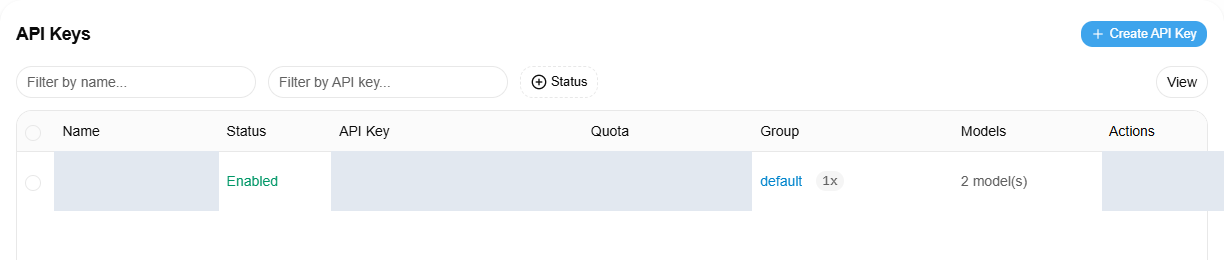
- Create the API key. On the API Keys page, create an API key and copy it.
Treat your Seedance API key like a password. Keep it on your server, in an environment variable, and never put it in browser or mobile app code. Anyone who has the API key can spend your balance.
In your terminal, save it once so the examples below can use it:
export TOKENROC_API_KEY="your-api-key"Your first Seedance 2.0 API request
Video is not returned in one response. Making a clip takes minutes, so the Seedance API works as a task:
- Submit a prompt with
POST /v1/videos. You get a task ID straight away. - Check the task with
GET /v1/videos/{id}until its status iscompleted. - Download the MP4 from
GET /v1/videos/{id}/contentusing the same API key.
Here is a 10-second clip at 720p with seedance-2.0, the $0.60 per-video option:
curl https://api.tokenroc.com/v1/videos \
  -H "Authorization: Bearer $TOKENROC_API_KEY" \
  -H "Content-Type: application/json" \
  -d '{
    "model": "seedance-2.0",
    "prompt": "A barista pours latte art in a small cafe, morning light, close-up, gentle cafe sounds",
    "duration": 10
  }'
The reply describes the task, not the video:
{
  "id": "task_...",
  "object": "video",
  "model": "seedance-2.0",
  "status": "queued",
  "progress": 0
}
Save the id before you do anything else, for example in your database. It is the only way to find the video again. If you lose track of a task, check the saved ID instead of resending the prompt: every submission is a new task with its own charge.
To check the task, ask for it by ID. Checking every 15 seconds is enough:
curl https://api.tokenroc.com/v1/videos/task_... \
  -H "Authorization: Bearer $TOKENROC_API_KEY"
The documented status values are queued, in_progress, completed, failed and unknown. Statuses other than completed or failed mean keep waiting until the time limit. For these Seedance models, metadata.url is rewritten to TokenRoc’s authenticated content endpoint. Download from that endpoint using your API key:
curl --fail -o latte.mp4 https://api.tokenroc.com/v1/videos/task_.../content \
  -H "Authorization: Bearer $TOKENROC_API_KEY"
Send the API key only to TokenRoc. If another model supplies an outside signed storage URL, download that URL without the API key.
If you prefer Python, this short script does all three steps with the standard library only:
import json, os, shutil, time, urllib.request

API = "https://api.tokenroc.com/v1"
HEADERS = {
    "Authorization": "Bearer " + os.environ["TOKENROC_API_KEY"],
    "Content-Type": "application/json",
}

class NoRedirect(urllib.request.HTTPRedirectHandler):
    def redirect_request(self, req, fp, code, msg, headers, newurl):
        return None

opener = urllib.request.build_opener(NoRedirect())

def call(method, path, body=None, timeout=60):
    data = None if body is None else json.dumps(body).encode()
    req = urllib.request.Request(API + path, data=data, headers=HEADERS, method=method)
    with opener.open(req, timeout=timeout) as resp:
        return json.load(resp)

task = call("POST", "/videos", {
    "model": "seedance-2.0",
    "prompt": "A barista pours latte art in a small cafe, morning light, close-up",
    "duration": 10,
})
task_id = task["id"]
print("Task:", task_id)
deadline = time.monotonic() + 30 * 60

try:
    while time.monotonic() < deadline:
        remaining = deadline - time.monotonic()
        task = call("GET", "/videos/" + task_id, timeout=min(60, remaining))
        status = task.get("status", "unknown")
        print("Status:", status)
        if status == "completed":
            req = urllib.request.Request(
                API + "/videos/" + task_id + "/content",
                headers={"Authorization": HEADERS["Authorization"]},
            )
            with opener.open(req, timeout=60) as resp, open("latte.mp4", "wb") as out:
                shutil.copyfileobj(resp, out)
            print("Saved latte.mp4")
            break
        if status == "failed":
            print("Task failed:", task.get("error", "Check Task Logs for the reason"))
            break
        # queued, in_progress, unknown and any other status keep waiting.
        remaining = deadline - time.monotonic()
        if remaining > 0:
            time.sleep(min(15, remaining))
    else:
        print("Stopped polling after the 30-minute time limit.")
finally:
    print("Check Task Logs at https://api.tokenroc.com/usage-logs/task with task ID:", task_id)
For 1080p, use seedance-2.0-1080p. For a 30-second clip, use seedance-2.5 and set duration to 30.
seedance-2.0 accepts 10 or 15 seconds. Fixed-price seedance-2.5 accepts 30 seconds. The per-second Seedance models accept integer durations from 4 to 15 seconds, including the 5-second 480p example below.
Checking the result and the cost
Every task is recorded in your console, so you never have to guess what happened or what you paid.
- Task Logs list every video task with its status. Use it to find a task ID you forgot to save.
- Usage Logs show the charge for each request, with the model ID and time.
- The Wallet page shows your remaining balance.
The charge is taken when you submit the task, not when the video is ready. That is why it can appear in Usage Logs while the task is still in_progress. For per-second models, the charge is based on the duration you ask for, so ask only for the length you need.
A failed task is refunded automatically. The refund appears in Usage Logs and restores the amount charged for that task.
A task usually finishes within a few minutes, sometimes longer when demand is high. If your own script stops waiting, the task keeps running. Check the same ID again later rather than submitting a new one. If a task stays queued or in_progress for several hours, contact TokenRoc with the task ID.
Tips for better clips and lower cost
- Write the prompt like a shot list. Name the subject, the action, the setting, the light and the camera. "A barista pours latte art, close-up, morning light, slow push-in" works far better than "coffee video".
- Describe the sound too. Seedance 2.0 makes audio with the picture, so a few words such as "gentle cafe sounds" or "no music" shape what you hear.
- Test cheap, then scale up. Try a new prompt at 480p with
seedance-2.0-480p, withdurationset to 5, which costs $0.50. Move to 720p or 1080p once the scene looks right. - Use the per-video price for standard clips. For 10 to 15 seconds at 720p,
seedance-2.0at $0.60 is a per-video option for the Seedance 2.0 API. - Ask only for the length you need. Per-second models charge for the full
durationyou request. - Store your videos yourself. Download through the authenticated content endpoint and save a copy in your own storage for later use.
Frequently asked questions
Can I call Seedance 2.0 through TokenRoc? Yes. TokenRoc gives you access to Seedance models through one API key, with prices in USD.
How much does the Seedance 2.0 API cost? On TokenRoc, from $0.60 for a 10 or 15 second clip at 720p, or from $0.10 per second at 480p. The full price list is in the pricing section above and in Model Square.
Do I need another account to get a Seedance API key? No. Create a TokenRoc account, add credit, and make an API key. The same API key works for Seedance, Kling, Wan and the text models.
What is the difference between the Seedance 2.0 and Seedance 2.5 API? Seedance 2.5 makes longer clips, up to 30 seconds, and costs a little more per second. Seedance 2.0 is cheaper and offers 4K output.
Can I make a video from an image? The TokenRoc relay accepts image references for Seedance requests. The reference fields differ by model; confirm the required format before submitting a request.
Is there a free trial? There is no free credit, but you can start with a $1 top-up. That covers a few test clips at 480p.
What happens if a video fails? The task ends with the status failed and an error message. A failed task is refunded automatically; check Usage Logs for the refund. Fix the cause before submitting a new task. If the refund is missing, contact us with the task ID.
Start building with the Seedance 2.0 API
You now have everything you need: the model IDs, the prices, an API key and working code. The next step is to run the 10-second example above and watch the task finish in your console.
Get your API key · Compare all video models and prices · Read the video docs